

In our daily lives, we often work with certain file formats . PDF is one of the most common, especially for eReaders, since most eBooks are currently available in PDF format. However, sometimes we need or want to convert them to other formats.
The most common format in many cases is .doc or .docx . There are several ways to convert a PDF to .doc format . We'll explain these methods below. Ready to learn how?
Converting a PDF to a DOC file, or vice versa, is a process we've all likely had to perform at some point . It's quite common. Therefore, it's helpful to know the different methods available to accomplish this. What options are available?
Google Drive
One of the easiest ways to convert a PDF to a DOC, which we can also do to convert documents to other formats, is to use Google Drive . As many of you know, we can upload documents to Google Drive and edit them using the suite that Google provides. We can do this with a PDF as well.

Therefore, the first thing we need to do is upload the PDF to Google Drive . Simply drag and drop the file into Drive. You can also use the file upload option; whichever you prefer. Once the file is uploaded, right-click on it . A series of options will appear, including "Open with." Select "Open with Google Docs ."
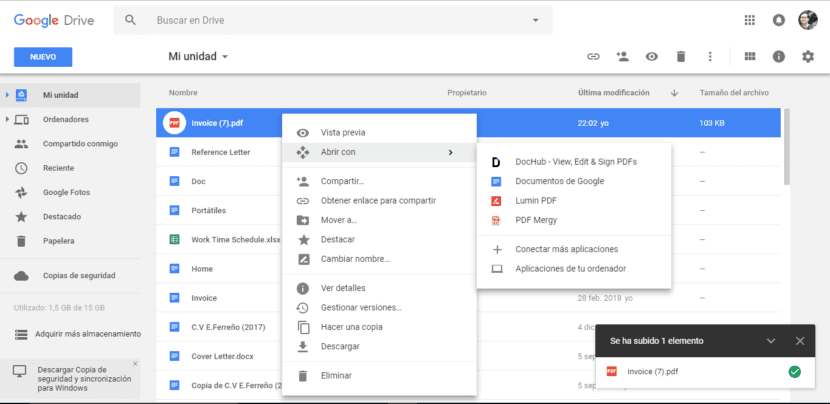
When we do this, the PDF opens as a text document that we can edit . So, if we want to make changes to it, we can do so without any problem. To convert and download it as a Word document, we simply go to File . We click on File, and one of the options that appears is Download As. There we can download it as a .doc file.
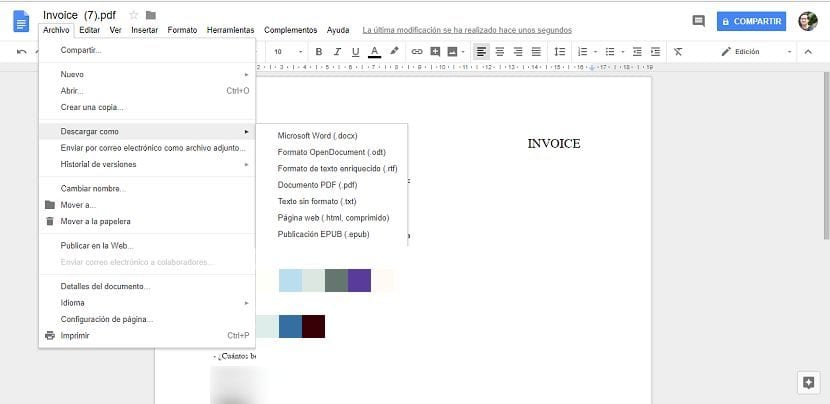
Therefore, we select the format in which we want to download the document, and in a matter of seconds it will automatically download to our computer. Thus, we now have the PDF file converted to a .doc file. As you can see, it's a very simple way to do this.
Web pages, convert pdf online
If this first option doesn't suit you, there are also many websites that can convert a PDF into a Word document (.doc) file . The number of these websites has grown considerably, making them a popular choice for users. A simple Google search will show you there are many. However, some options always stand out from the rest.
Therefore, we'll tell you about some additional options that are currently available . You might find them interesting, and they're a good way to convert a PDF to a .doc file.
PDFToWord
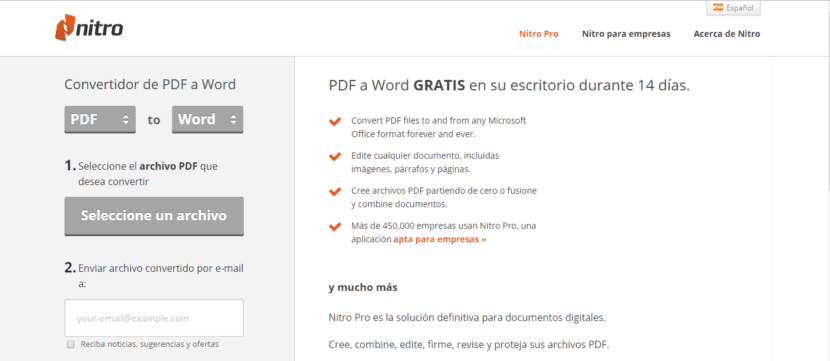
Possibly one of the best-known options among users, and one of the first that usually appears when you search online, this website allows you to convert PDFs to other formats . In fact, you can convert various formats. Simply upload the PDF to the website, select the desired format (doc in this case), and wait for the process to complete.
A very convenient option that doesn't take long to complete and requires no user intervention . So, if you're looking for something simple, this might be an option you'll find useful. You can visit the website and start using it at this link . You can try it for free , and if you're a business and want additional features, there's a paid option. But converting files is completely free.
PDF2DOC
Another well-known website of this type, popular with most users, is one that allows us to work with PDF files with great ease . It gives us the ability to convert this format to many others, so we can convert it to a DOC file as we wish. But if we need to work with other formats, such as JPG, text, or PNG, we can do that too. So we have no problem in that regard.
All we have to do is select the format we want to convert the files from . Then we drag the PDF file to the website , and that's it. We simply have to wait for the website to complete the process, which only takes a few seconds. After that, the document is ready to download , and we can use it however we like.
One of the strengths of this website is that it differentiates between .doc and .docx files . Therefore, depending on the version of Word you have on your device, you'll find it more convenient to use one or the other. This makes the website very user-friendly. You can visit it and start using it at this link . The website is completely free.

These are the methods currently available to convert a PDF file to a DOC document. As you can see, both methods are simple. Furthermore, in neither case is there a need to install any third-party programs or applications . This undoubtedly makes the entire process much simpler and more convenient for everyone.
This way, you can transform the PDFs you use on your eReader into a document that you can easily open and edit in Word. As for websites, as we mentioned, there are many options. But these two are among the best-known and most reliable you can find. There are many other options available that will work the same way. We hope this has been helpful.